Adobe Introduces AI Presentation Generator Across Express and Acrobat Platforms
Creating professional presentation decks has long been one of the most time-consuming administrative tasks for business teams, educators, and creative professionals. The process typically demands not only synthesizing complex data and written content but also manually arranging text blocks, selecting visual assets, and ensuring consistent layout design across multiple slides. When information is locked within existing reports, PDFs, or unstructured meeting notes, converting that content into a presentable slide deck has traditionally required tedious copying and pasting. To address these operational friction points, Adobe has introduced an artificial intelligence presentation generator within Adobe Express and integrated across the Adobe Acrobat platform.
The tool is designed to automate the initial drafting stage of slide creation while maintaining flexible options for editing, collaborative review, and export into standard industry formats. By leveraging Adobe’s background in visual design and document management, the presentation generator combines prompt-based content creation with document parsing, giving users multiple paths to generate structured slide decks for team meetings, client pitches, and training seminars.
Dual Entry Points: Prompt-Based Creation and Document Parsing
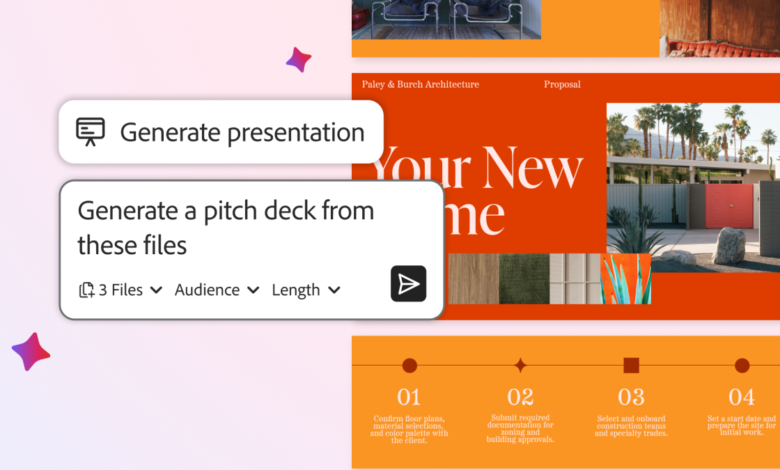
The presentation generator operates through two distinct input workflows depending on the user’s starting point and existing materials. For projects starting from a blank slate or a broad concept, users can initiate slide creation through natural language text prompts. By supplying a brief description of the intended presentation topic, target audience, and key messaging goals, the underlying AI constructs a multi-slide draft deck automatically. This prompt-to-presentation workflow is aimed at rapidly generating early stage concepts, allowing creators to jump straight from ideas to visual outlines without manually formatting every frame.
For workflows built on pre-existing documentation, the platform allows direct file uploads of PDFs and textual notes. Rather than requiring users to manually extract key points and paste them into individual slide containers, the tool automatically parses the source documents, identifies structural themes, and translates the material into a sequenced presentation. This approach eliminates the redundant manual labor involved in rekeying data from static reference documents into presentation software, condensing hours of formatting into a multi-slide draft produced in minutes.
Content-Responsive Slide Design and Template Integration
A persistent limitation among generic presentation software and early automated slide tools is the application of rigid, monotonous templates. Automated engines frequently apply identical visual layouts across every slide regardless of the nature of the information being presented, resulting in cluttered charts or unreadable narrative blocks. Adobe’s presentation generator addresses this by employing content-aware layout matching that dynamically pairs slide structures with the specific type of information being presented.
When the generator encounters data-heavy sections within a prompt or uploaded document, it automatically formats those slides using structured charts and financial tables to enhance numerical clarity. Conversely, when processing qualitative explanations, summary points, or strategic narratives, the engine selects text-focused layouts engineered for readability. The visual architecture of these slides is built upon Adobe’s existing library of professionally designed templates, ensuring that the initial automated draft adheres to established typographic and spatial standards rather than looking like an unformatted data dump.
Customization, Branding Control, and Visual Fine-Tuning
While the AI engine automates the structural assembly of the presentation, the system maintains comprehensive post-generation editing capabilities to ensure brand compliance and messaging accuracy. Automated drafts serve as flexible foundation layers rather than final, unalterable products. Users retain complete visual and editorial control over every element within the generated slides.
Within the editing interface, creators can adjust color palettes to align with specific organizational style guides, apply corporate branding elements, swap default images for custom graphic assets, and fine-tune written copy. This design flexibility ensures that internal communications teams and marketers can enforce brand governance without sacrificing the speed advantages provided by automated slide generation.
Cross-Platform Compatibility and Collaborative Workflows
File format lock-in presents a significant challenge in modern corporate environments, where different departments often rely on distinct software ecosystems. Generic web-based AI tools frequently store presentations in proprietary formats that fail to export cleanly into standard desktop applications, forcing teams to adopt fragmented software tools or fix broken layouts after export. Adobe mitigates this issue by building natively supported export options into the presentation engine.
Completed presentations can be exported directly into the widely used PowerPoint format (.pptx). This compatibility ensures that teams can open, refine, and present their decks across established presentation platforms, including Microsoft PowerPoint, Apple Keynote, and Google Slides, without suffering from layout distortion or missing elements. Furthermore, decks can be exported directly to PDF format, facilitating the immediate production of printable slides or digital handouts suitable for formal training sessions, executive briefings, or quarterly financial presentations.
Collaborative features are similarly designed to minimize file management friction. Rather than distributing standalone file attachments across email chains—a practice that inevitably leads to conflicting file versions and overwritten edits—the platform supports link-based sharing. Users can generate sharing links that invite team members to view, comment on, or co-edit presentations in real-time within a central cloud workspace. By consolidating feedback and edits into a single live environment, the system prevents versioning errors and streamlines group review processes.
Ecosystem Integration and Accessibility Model
The AI presentation generator is integrated directly into Adobe Express, which offers a free access tier for individuals and organizations. It is also embedded within the broader Adobe Acrobat subscription software suite, connecting presentation generation with a wide array of document workflows. Existing subscribers to Adobe Acrobat can access the presentation tool immediately without paying additional licensing fees or purchasing separate software add-ons.
Within the broader Acrobat ecosystem, the presentation generator sits alongside a suite of AI-assisted document utility tools. These capabilities include automated PDF editing features, AI-powered document insight generation, automated project workflow tools, and content creation assets for designing social media posts, promotional flyers, and data infographics. By grouping presentation building alongside broader document processing tools, the platform aims to centralize creative and administrative asset production within a single software environment.
Strategic Implications for Business Workflows
The introduction of AI presentation tools within established software suites highlights a growing trend toward automated content transformation in workplace operations. By bridging the gap between static document storage (such as PDFs) and dynamic visual presentation formats (such as slide decks), organizations can significantly lower the time investment required to communicate complex information. Teams are able to pivot quickly from raw document analysis to external presentation readiness, shifting human effort away from formatting mechanics and toward narrative refinement, strategic interpretation, and pitch delivery.
However, the successful integration of automated slide tools still relies on prudent editorial management. While content-responsive algorithms efficiently organize narrative blocks and numerical data into professional layouts, human review remains essential to verify that automated summaries accurately represent underlying source material, protect proprietary formatting standards, and effectively address the target audience.