Demystifying Soundbar HDMI Passthrough: How It Works and Why You Might Need It
Connecting a home entertainment system used to be as simple as running a single cable from a media player to a television screen. As modern displays have become thinner and audio technology has advanced, home theater setups have grown increasingly complex. Adding a soundbar is one of the most effective ways to upgrade your television’s native audio, but navigating the back panel of a modern soundbar introduces a variety of connectivity choices. Among the various features listed on audio equipment spec sheets, HDMI passthrough is one of the most practical, yet frequently misunderstood, capabilities available.
HDMI passthrough allows a soundbar to act as an intermediary for both audio and video signals. Instead of plugging all your playback devices—such as gaming consoles, streaming media players, or Blu-ray players—directly into your television, HDMI passthrough enables you to route a source device into the soundbar first. The soundbar extracts and decodes the audio signal locally while passing the video signal through to the display without degrading the image quality.
Understanding how this technology operates, how it differs from return audio channels, and when it is actually necessary can prevent frustrating connectivity bottlenecks in your living room.
How HDMI Passthrough Works in Practice
In a traditional home theater configuration without passthrough, the television serves as the central hub for all incoming media. You connect your media devices directly to the television’s HDMI ports. The television receives the combined audio and video stream, displays the picture on screen, and sends the audio signal outward to an external soundbar using either an optical cable or an HDMI connection.
HDMI passthrough reverses the initial direction of that connection for specific devices. When a soundbar includes an dedicated HDMI input in addition to its primary HDMI output, you can plug a source device directly into the soundbar itself. The signal path then operates in two steps:
- Audio Extraction: The soundbar receives the full signal from the playback device, intercepts the sound data, and processes it immediately through its own amplifier and speakers.
- Video Transmission: The soundbar forwards the remaining video data out through its HDMI output port directly into the television screen, displaying the picture without altering resolution or visual fidelity.
This physical architecture effectively turns the soundbar into an auxiliary video switcher, extending the overall routing capabilities of your entertainment space.
HDMI Passthrough vs. HDMI ARC and eARC
It is common to confuse HDMI passthrough with HDMI ARC (Audio Return Channel) and eARC (Enhanced Audio Return Channel), as both mechanisms rely on HDMI cables. However, they describe opposing signal routes designed to solve different connectivity problems.
HDMI ARC and eARC are designed to send sound downstream from the television to the soundbar. For instance, if you are watching a movie using a built-in app on your smart television, an eARC connection allows the TV to stream that audio down to the soundbar through the single cable connecting them. The primary difference between basic ARC and eARC comes down to bandwidth: eARC offers substantially higher data capacity, allowing it to transfer uncompressed, high-bitrate surround sound formats.
In contrast, HDMI passthrough sends the video signal upstream from the soundbar to the television. The two features operate in tandem within the same setup. For example, a gaming console can feed audio into the soundbar via passthrough while passing video to the screen. At the same time, the underlying eARC protocol on that same main HDMI cable allows the television to send sound back to the soundbar whenever you switch over to the TV’s internal broadcast tuner or smart apps.
Three Core Scenarios Where HDMI Passthrough Is Essential
While HDMI passthrough adds versatility, not every home entertainment setup requires it. For many households, connecting all source hardware directly to the display remains the simplest choice. However, three specific technical constraints make passthrough an invaluable feature.
1. Overcoming Physical HDMI Port Limits
Many modern mid-range and entry-level televisions feature only three or four built-in HDMI inputs. If you own a cable box, a modern gaming console, a media streaming stick, and a standalone disc player, your available ports are exhausted immediately. Because a soundbar occupies one of the television’s HDMI ports to receive audio, adding a soundbar effectively reduces your available display inputs by one. A soundbar equipped with HDMI passthrough restores that lost input by providing a port on its own chassis, ensuring you do not have to manually swap cables behind the TV screen.
2. Preserving Limited HDMI 2.1 Bandwidth
A more common modern challenge involves bandwidth standards rather than physical port counts. Modern gaming consoles and high-end video devices utilize HDMI 2.1 features, which support demanding performance specs like 4K resolution at 120Hz refresh rates alongside Variable Refresh Rate (VRR) tech. Many televisions on the market today feature four total HDMI connections, but only two of those ports actually support full HDMI 2.1 speeds.
To make matters more challenging, manufacturers often designate one of those two high-bandwidth HDMI 2.1 slots as the designated eARC port. Plugging a soundbar into the display’s eARC port leaves only a single remaining HDMI 2.1 port available for high-performance devices. If you own both a PlayStation 5 and an Xbox Series X, or pair a console with a high-frame-rate streaming device, you run out of fast ports instantly. A soundbar that supports full HDMI 2.1 passthrough solves this by allowing a high-bandwidth console to plug directly into the soundbar without sacrificing high-frame-rate video features on its way to the TV screen.
3. Bypassing Television Audio Format Restrictions
Audio formatting compatibility represents another key reason to utilize passthrough. Multi-channel audio standards require appropriate software decoders to function. While formats like Dolby Atmos are nearly universally supported across modern displays, rival formats like DTS (including DTS:X) are not handled by every television brand. Certain major manufacturers omit native DTS decoding software from their televisions entirely.
If you connect a Blu-ray player or console outputting a DTS soundtrack directly to a television that lacks DTS support, the television may downgrade the sound to standard stereo or fail to transmit audio to your soundbar altogether. By routing the media player directly into an HDMI passthrough port on a soundbar that features built-in DTS decoding, the soundbar handles the audio signal natively before the display ever touches the signal. This removes display-side software limitations from the playback loop.
When Can You Skip HDMI Passthrough?
Despite its advantages, HDMI passthrough is not a mandatory requirement for every buyer. If your television features enough total ports, includes HDMI 2.1 bandwidth across all inputs, and offers broad audio format decoding, connecting every device directly to your screen remains the recommended baseline.
Direct-to-TV wiring minimizes potential compatibility hiccups. Every component added between a source device and a display introduces an additional point of potential signal disruption or handshaking delays—where devices negotiate resolution and copy protection protocols over HDMI. Keeping the path between your playback device and your display as direct as possible ensures reliable operation and reduces system troubleshooting.
Key Specifications to Evaluate Before Purchasing
If you determine that HDMI passthrough is necessary for your living room setup, reviewing spec sheets carefully is critical. Port labels and marketing terminology can occasionally be ambiguous.
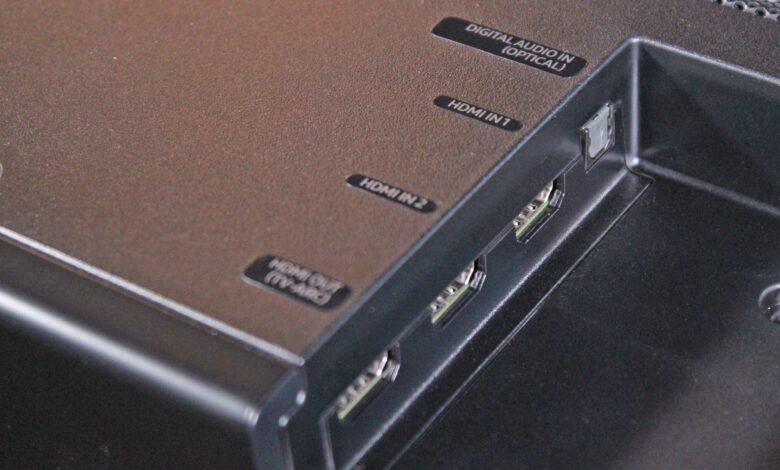
First, verify the physical connectivity on the back of the speaker. A soundbar must feature an independent input labelled “HDMI In” or “HDMI Input” alongside its standard “HDMI Out (ARC/eARC)” connector. If a soundbar advertises HDMI eARC functionality but lists only a single physical HDMI socket, it cannot provide passthrough capability.
Second, review the video format standards supported by the soundbar’s input. Simply having an HDMI input does not guarantee that every video feature will pass through unhindered. Pay close attention to these parameters:
- Resolution and Frame Rate: Ensure the passthrough circuit explicitly lists support for 4K at 60Hz or 4K at 120Hz, depending on your playback hardware requirements.
- HDR Compatibility: Check for passthrough compatibility with High Dynamic Range formats such as Dolby Vision and HDR10+.
- Gaming Technologies: If you connect a modern console, confirm support for Variable Refresh Rate (VRR) and Auto Low Latency Mode (ALLM).
Featured Soundbars With HDMI Passthrough Capabilities
Manufacturers offer HDMI passthrough across various price points and hardware configurations, ranging from full surround-sound packages to minimal, single-unit designs.
| Soundbar Model | HDMI Inputs | Supported Passthrough Features | System Configuration |
|---|---|---|---|
| Samsung HW-Q990H | 2 HDMI Inputs | 4K 120Hz, Dolby Vision HDR, VRR | Flagship surround system with sub & rear speakers |
| Samsung HW-Q800F | 1 HDMI Input | 4K 120Hz, Dolby Vision HDR, VRR | Mid-range setup (without rear speakers) |
| Klipsch Flexus Core 300 | 1 HDMI Input | Passthrough Supported (Specific formats not specified) | All-in-one soundbar (no sub or rear speakers) |
Top-tier models like the Samsung HW-Q990H provide comprehensive routing capabilities by integrating two separate HDMI inputs alongside the main eARC output. This allows multiple high-performance sources to pass 4K signals at 120Hz while preserving advanced features like Dolby Vision and VRR. Mid-range choices like the Samsung HW-Q800F retain these high-bandwidth gaming features while offering a single auxiliary input for users who do not require dedicated rear surround speakers.
For listeners seeking a streamlined footprint, all-in-one designs such as the Klipsch Flexus Core 300 integrate passthrough ports directly into a single soundbar enclosure, eliminating the need for external subwoofers or satellite wiring while preserving input expansion possibilities.
Evaluating your current collection of media hardware, checking your television’s port availability, and assessing your future gaming needs will dictate whether HDMI passthrough is an essential feature for your home audio upgrade or simply a nice-to-have extra.